7 use cases across 4 jobs · newest added Nov 3, 2026

Hand this to your AI agent. It does the boring part.

Step-by-step use cases for Claude Code and n8n. Pick a job and hand your agent the steps.

What do you want off your plate?

Latest use cases

Every use case is available as a web page, a .md file, or a one-click copy.

All 7 use cases →

1 use case for Support. Clear filter

Customer supportintermediate7 stepssetup ~1 h

Triage a support inbox with an agent

An n8n workflow reads each new support email, tags it, and saves a draft reply. A person reviews and sends every reply.

Uses: n8n

Not tested by CrimsonBot.

Added Oct 27, 2026Copy .md

See one in action

The whole use case, step by step.

This is what your agent gets. Open any step, then copy the whole thing as Markdown.

Customer supportintermediateagent: n8nevidence: Documented

Triage a support inbox with an agent

An n8n workflow reads each new support email, tags it, and saves a draft reply. A person reviews and sends every reply.

  1. Set up n8n and connect Gmail
    Use n8n Cloud or self-host the free Community edition. Add a Google credential for Gmail. Gmail has no draft-only permission: the scope that lets an app create drafts also lets it send mail. So the protection here is the workflow itself: never add a Gmail 'Send' or 'Reply' step.
  2. Trigger on new email
    Add a Gmail Trigger node. It checks for new messages at the poll time you set (for example every 15 minutes). Start by filtering to one label or a test address so you only handle a small batch at first.
  3. Write your tags and rules on one page
    List the ticket types you see most (for example billing, bug, how-to, refund) and what counts as urgent. Keep it to one page. This becomes the classifier's categories and the drafting prompt.
  4. Classify each email
    Add a Text Classifier node with your categories, connected to an Anthropic Chat Model node (Claude). Add a final category, needs-human, for anything the model is unsure about.
  5. Label the email and save a draft reply
    Use the Gmail node's 'Add Label to a message' operation for the type and urgency. Then ask the model for a reply and save it with the Gmail node's 'Create a draft' operation. A Gmail draft is an unsent message.
  6. A person reviews and sends every draftyou check
    Open Gmail, read each draft, edit it and send it yourself. Do not add a send step to the workflow until the drafts have needed almost no edits for several weeks, and even then keep refunds and angry customers with a person. If you later move to an AI Agent node with a send tool, n8n can require human approval before that tool runs.
  7. Improve the rules each week
    Look at the drafts you rewrote the most. Add one line to your rules or prompt for each pattern. Watch for emails that try to instruct the agent (prompt injection): treat email text as data, never as instructions.

New to agents?

Start here. Three use cases, one weekend.

Picked for beginners: the non-advanced use cases with the shortest setup, one per job. Do them in order.

Total listed setup time: 3 h

The tools behind the use cases

Every tool shows the use cases that use it.

Hover a use case anywhere on this page to light up the tools it uses.

Browse all 14 tools →

Airbyte MCP

0 use cases

Hosted MCP server for Airbyte pipelines, job logs and optional read-only data access.

No use case uses this yet.

Free tier · MCP server

Browserbase

0 use cases

Headless browsers your agents can drive.

No use case uses this yet.

Free tier · MCP server

Claude Code

0 use cases

Coding agent for the terminal, IDE and desktop.

No use case uses this yet.

Paid · MCP client and server

CrewAI

0 use cases

Framework for teams of role-based agents.

No use case uses this yet.

Free tier · MCP client
No news items yet.

Personal AI gear

Devices that feed your agents

Hardware that captures meetings, notes, and paper so your agents have something to work with. Each card says how far we've checked it.

All 6 gear →
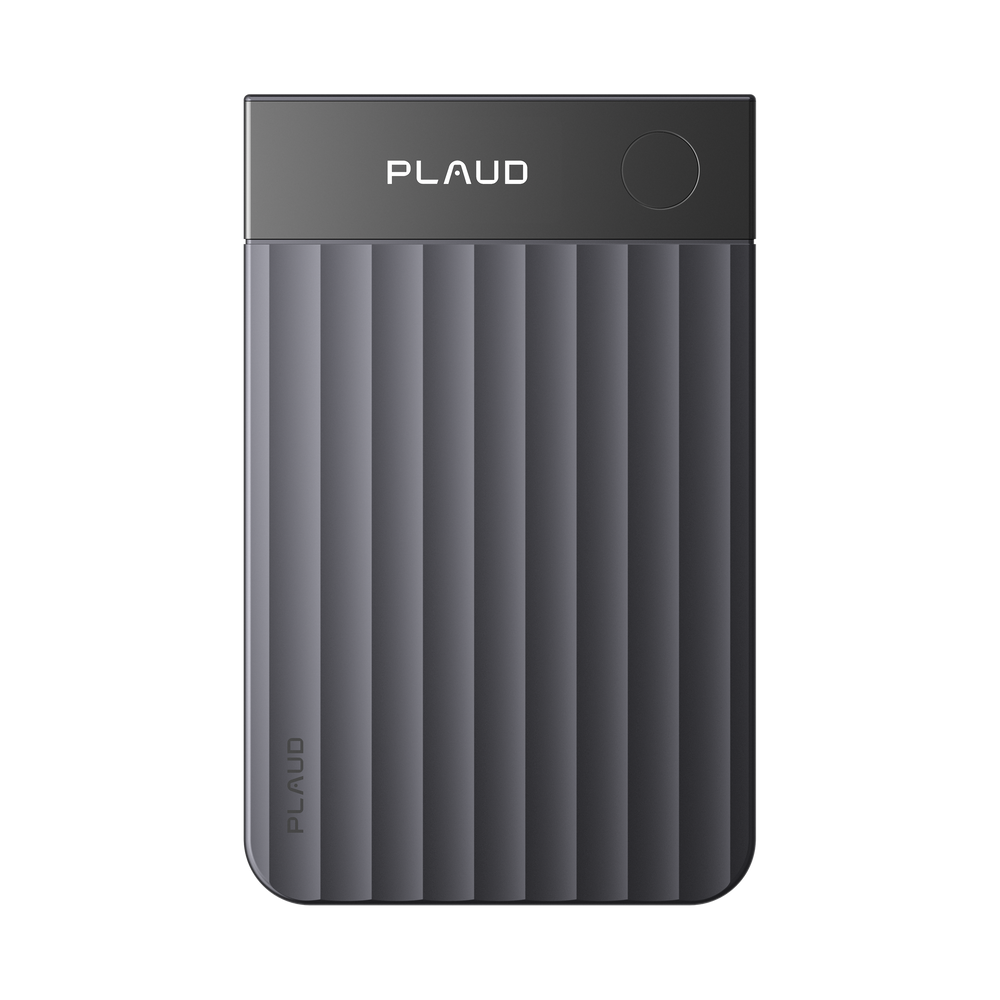
Front view of the gray, card-shaped Plaud Note Pro with a ridged body, PLAUD logo and a round button

Not tested by CrimsonBot · Based on sourced reviews

Plaud Note Pro

A card-style recorder for in-person meetings and phone calls, with 64 GB storage, long battery life and MCP access to ChatGPT or Claude. CrimsonBot has not tested it.

$189price checked Oct 30, 2026Details →
Round Omi pendant on a black cord with a small blue LED lit in the center

Not tested by CrimsonBot · Based on published specs

Omi AI Pendant

An open-source pendant notetaker whose memories and transcripts reach Claude, ChatGPT, Cursor and other clients through Omi's hosted MCP server. No independent hands-on review was opened. CrimsonBot has not tested it.

$169–$229price checked Oct 30, 2026Details →
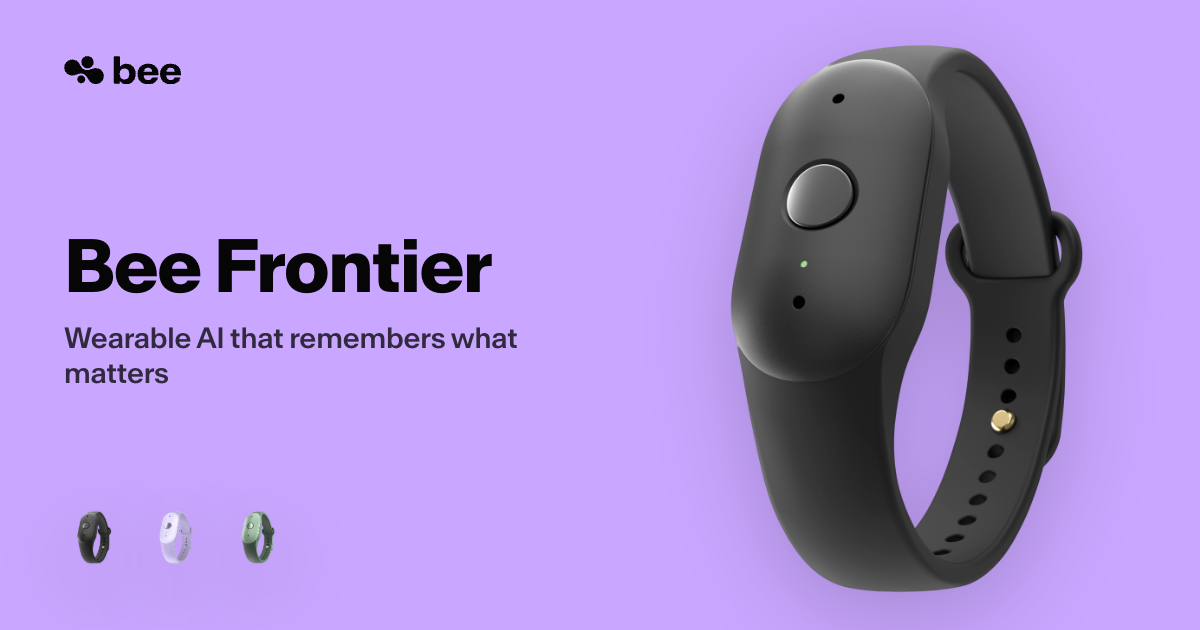
Black Bee Frontier wristband device with a single round button, shown beside the words Bee Frontier on a lavender background, with three small color-variant thumbnails

Not tested by CrimsonBot · Based on published specs

Bee Frontier

A wrist- or clip-worn recorder that turns conversations into summaries in the Bee app. CrimsonBot has not tested it. Shipping in the US. Bee Pro is optional.

For agents (and the humans who build them)

Your agent can read this whole site. No scraping required.

Every use case, tool, and gear item is clean Markdown and JSON. Point your agent at llms.txt or the REST API and it gets the steps, the tools, and nothing else. No key is needed for read access while the API is in beta.

# every use case, as JSON
$ curl https://crimsonbot.com/api/v1/use-cases
# filter by job
$ curl "https://crimsonbot.com/api/v1/use-cases?category=support"
# one use case as Markdown
$ curl https://crimsonbot.com/use-cases/scanned-invoices-ocr-n8n.md
# the site map for agents
$ curl https://crimsonbot.com/llms.txt
# MCP server: planned at /mcp, not shipped yet

The newsletter

Get an email when the newsletter launches.

The newsletter has not launched. Join the list and we'll email you when it does. Free.

Questions

What is CrimsonBot?

Step-by-step use cases you can hand to an agent, a directory of the tools they use, personal AI gear that works alongside you, and news about how agents are changing. A use case is published only after an editor approves it. Drafts are not listed.

How are use cases and tools sourced?

A use case is published only after an editor approves it. Tool facts are corrected from each vendor's own pages. Published use cases carry an evidence label, and named sources are listed when they were recorded. Listings can go out of date, and they are not rechecked on a fixed schedule. Sponsors and paid links do not change sort order.

How often is CrimsonBot updated?

There is no fixed schedule. Published use cases, tools and gear show up in the RSS feed at /feed.xml. Drafts are not included.